Design
BrideMatch is an innovative AI-powered virtual wedding dress try-on platform designed to help brides-to-be visualize their dream gown with confidence and ease. It allows users to upload a personal photo and instantly see themselves in a vast array of wedding dress styles and silhouettes, streamlining the bridal discovery journey before traditional boutique appointments. Key Features Realistic AI-generated virtual try-ons in seconds. Private and secure photo uploads, never shared. Extensive curated catalog of popular wedding dress styles and silhouettes (A-Line, Ball Gown, Mermaid, Sheath, etc.). Smart comparison tool for side-by-side viewing of favorite looks. Option to upload custom dress references (e.g., from Pinterest or salons). Free first try-on with no credit card or sign-up required. Use Cases BrideMatch serves as a comprehensive virtual bridal fitting room, enabling brides to explore countless options from the comfort of their home. It's ideal for AI bridal visualization, helping users discover their unique wedding dress style, including inclusive options like Plus Size Wedding Dress Try-On and Vintage Wedding Dress Try-On. Brides can experiment with different necklines, sleeves, and fabrics, narrowing down their preferences before committing to in-person fittings. The platform also empowers users to compare various wedding gown silhouettes against their body shape, ensuring they find the most flattering and desired look. Whether seeking a glamorous mermaid, a classic ball gown, or a sleek minimalist sheath, BrideMatch offers a practical solution for informed decision-making, solving the common problem of overwhelming choices and the stress of boutique visits by providing instant, realistic previews. Pricing Information BrideMatch operates on a freemium model, offering a complimentary first try-on and additional free credits upon registration. Subsequent use is credit-based, with plans like 'Bride Standard' at $7.99 for 25 credits and 'Bride Ultimate' at $19.99 for 100 credits. Each credit typically equates to one AI photo try-on, with video generation costing 5 credits. No credit card is required for the free trial. User Experience and Support The user experience is designed for simplicity, involving three steps: upload a clear photo, choose a wedding dress style, and instantly see the AI-generated result. The interface is intuitive, providing instant previews and a private dashboard for registered users to save and compare their fitting history. A comprehensive FAQ section addresses common questions regarding photo privacy, realistic results, and platform functionality. Technical Details Leveraging advanced AI, BrideMatch generates realistic try-ons that adapt to the user's natural contours, skin tone, and proportions. The system ensures realistic AI lighting that adapts to the environment of the uploaded photo. The 'Bride Ultimate' plan benefits from priority high-speed GPU rendering for faster results. Pros Highly realistic AI-generated try-ons. Ensures user privacy and data security. Offers a free trial without commitment. Extensive catalog and custom dress upload feature. Reduces stress and time spent on initial boutique visits. Cons Cannot provide exact sizing or tailoring details. Not a full replacement for in-person fittings. Credit-based system for extended use. Requires a clear, well-lit photo for best results. Conclusion BrideMatch revolutionizes the wedding dress shopping experience by offering a secure, convenient, and highly realistic virtual try-on solution. It empowers brides to explore endless possibilities, discover their unique style, and make confident decisions from anywhere. Start your virtual fitting journey today and find your perfect wedding dress with BrideMatch.

PNG to SVG is a free collection of browser-based tools for converting and optimizing images.Turn PNG or JPG files into scalable SVG graphics, convert JPG and WebP images to PNG, and compress SVG, PNG, or JPG files—all without uploading anything to a server.Everything is processed locally in your browser, making the experience fast, private, and easy to use. There are no accounts, watermarks, or usage limits.Available in English, Russian, Spanish, German, and French.

Ready-made four-color palettes, a page for every named color with its shade scale and contrast figures, and tools that build palettes, pull them out of photos and check whether two colors are legible. Nothing uploads. Free for commercial use, no account.

Blur & Unblur AI is a free browser-based editor for blurring faces, unblurring selected face regions, and applying full photo blur. It supports automatic face detection, manual lasso masks, adjustable strength, and clean PNG export without uploading source photos to a processing server.
Generate a brand palette and visual identity from a word or image.

Thank Cards is an innovative interactive animated greeting card software powered by HTML5, offering a free multimedia alternative to platforms like Canva and Evite. Its primary purpose is to empower users to effortlessly create, personalize, and share stunning animated eCards for virtually any occasion, bringing messages to life with dynamic visuals and sound. The platform caters to a broad audience, from individuals celebrating personal milestones to businesses sending professional greetings, making it ideal for anyone seeking engaging digital communication.Key Features:Extensive library of free, customizable animated templates for diverse occasions.Intuitive editor for adding personalized messages, uploading photos, and adjusting animations.Unique custom background music synchronization for an immersive experience.Innovative two-way interactive Write Back replies, fostering deeper engagement.Digital sharing capabilities via direct link or popular social media platforms.Ability to save and manage all created cards in a personal "My Cards" record list.Use Cases:Thank Cards excels in facilitating personal celebrations, allowing users to craft unique animated birthday cards for loved ones, heartfelt love confessions, or special Mother's and Father's Day greetings. The platform offers specific templates tailored to various relationships and events, ensuring a perfect fit for every sentiment.Beyond personal use, Thank Cards is an excellent tool for holiday greetings, providing a dynamic way to celebrate seasonal events like Christmas, Easter, Thanksgiving, and Women's Day, as well as cultural festivities such as Lunar New Year. Its animated nature makes these greetings more memorable and impactful than static alternatives.Furthermore, the platform extends its utility to professional and event-based communications. Users can leverage Thank Cards for business-related thank you notes, such as the "Black Business Envelope Animated Thanksgiving Card," or for creating engaging invitations for academic seminars, store openings, and other events, adding a touch of sophistication and interactivity.Pricing Information:Thank Cards operates on a freemium model, providing a substantial collection of free animated card templates that users can access and utilize without any cost. For those seeking enhanced functionalities or exclusive designs, a premium version is available, which typically unlocks more advanced editing tools and a broader selection of templates. Specific details regarding premium features can be found on the "Go Premium" payment panel.User Experience and Support:The user experience on Thank Cards is designed for simplicity, following a straightforward 3-step process: Choose a Design, Personalize It, and Send It. The editor is described as easy-to-use, enabling quick customization of messages, photos, and animations. All created cards are conveniently stored in the "My Cards" section, allowing users to view, edit, or reshare them at any time. For any assistance or inquiries, users can contact the platform's support team via email at support@thankcards.com.Technical Details:Thank Cards is built as an interactive animated greeting card software, leveraging the power of HTML5 to deliver its dynamic visual and audio experiences. This foundation enables features such as custom background music synchronization and the unique two-way interactive Write Back replies, ensuring a rich and engaging user interaction.Pros and Cons:Pros:Extensive library of free animated templates for diverse occasions.User-friendly 3-step creation process and intuitive editor.Supports custom background music synchronization.Features unique two-way interactive Write Back replies.Ability to save and manage all created cards for future use.Wide range of categories covering personal, holiday, and professional needs.Cons:Does not currently support physical mailing services; sharing is digital only.Specific details of the premium version's features are not explicitly outlined in the provided content.Conclusion:Thank Cards offers a highly accessible and feature-rich solution for crafting engaging animated eCards, serving as a vibrant and interactive alternative to traditional greetings. With its extensive free templates, intuitive design tools, and unique interactive capabilities, it provides immense value for personal and professional communication. Explore Thank Cards today to effortlessly bring your heartfelt messages to life and connect with others in a dynamic new way.

wallpreview.app is an innovative SaaS platform designed for artists, poster shops, and galleries to effortlessly visualize their artwork in stunning, true-to-scale interior settings. It provides beautiful, pre-selected interiors, eliminating the need for users to upload their own room photos, and offers instant, realistic previews that significantly enhance the art selling and buying experience. Key Features True-to-Scale Interior Previews: Generates realistic mockups with accurate framing, soft daylight, and real shadows. Instant Room Shuffling: Quickly browse diverse room styles without rendering delays. Embeddable E-commerce Widget: Integrate directly onto product pages for seamless customer previews. One-by-One Image Generation: Create shareable preview images for social media, email, and more. No Photo Upload Required: Utilizes a curated library of interiors, simplifying the visualization process. Freemium Access: Enjoy 2 free image renders daily, with a Pro plan for unlimited use and embed features. Use Cases wallpreview.app is invaluable for businesses enhancing product visualization. Art galleries and artists can showcase paintings on a real wall, helping buyers envision artwork in their homes. Furniture and interior brands can help customers imagine products within a home environment. Reproduction shops benefit by displaying prints framed and beautifully presented. The app effectively moves customers from "I like this product" to "I can see this in my home," boosting conversion rates. Pricing Information The platform offers a freemium model: 2 free image renders daily without a credit card. A Pro plan unlocks unlimited previews and the embed widget. Subscriptions are cancellable anytime with one click, and plan switches are prorated. Payments are securely processed via Stripe, supporting major cards, Apple Pay, Google Pay, and SEPA. User Experience and Support wallpreview.app prioritizes ease of use, allowing users to try it free without signup. The workflow is simple: upload your piece, pick a room, and share or embed. Comprehensive support resources, including legal documents, are available. The intuitive interface ensures a smooth experience for both sellers and buyers. Technical Details Operating as a web-based application, wallpreview.app leverages an optimized rendering engine for instant visual feedback. It integrates with Stripe for secure and diverse payment options, ensuring a reliable transaction environment. The focus is on delivering high-quality, real-time visual mockups efficiently. Pros and Cons Pros: Realistic, true-to-scale previews; instant room shuffling; embeddable for e-commerce; freemium model; no user photo upload needed; easy sharing; secure payments. Cons: Limited free usage; no explicit room customization; relies on pre-selected interiors. Conclusion wallpreview.app is an essential tool for anyone selling art or home decor online, providing a seamless and realistic way to present products. By enabling customers to easily visualize items in a home setting, it significantly enhances engagement and drives sales. Try wallpreview.app today to transform your online product presentation.
Yooiu is a meticulously curated navigation directory for discovering innovative AI and creative products. It serves as a comprehensive hub for individuals and businesses seeking to explore, compare, and select cutting-edge tools crafted by talented creators worldwide, streamlining the search for the perfect solution. Target Audience Ideal for developers, designers, marketers, educators, and anyone leveraging artificial intelligence and creative software to enhance workflows or explore new technologies. Key Features Curated Product Listings: Handpicked AI and creative tools ensuring quality and relevance. Intuitive Category Navigation: Easily browse products across diverse categories like AI, Design, and Productivity. Advanced Search Functionality: Quickly find specific tools or explore options by keywords. Dynamic Ranking Systems: Discover products via Featured, Premium, Newest, Most Used, and Free Tools sections. Creator Submission Portal: Makers can submit products, with premium options for enhanced visibility. Use Cases Yooiu is invaluable for users seeking new AI tools for image generation, writing assistance, or code copilots, as well as creative software for design or video editing. It helps users find free tools or premium options based on specific needs and stay updated with the latest releases. For product creators, Yooiu offers a targeted platform to showcase innovations, gaining visibility and reaching an engaged audience through listings and premium placement options. Pricing Information Yooiu operates on a freemium model for product submissions. Users can browse and discover products for free. Creators can submit products for free or opt for premium placement for faster approval and better visibility. Pricing for individual listed products varies, often including free trials or freemium options. User Experience and Support The platform features a clean, modern, and user-friendly interface, making product discovery effortless through logical categories and a search bar. While specific documentation for Yooiu isn't detailed, its intuitive design ensures a smooth user journey. Support is available via a 'Contact Us' link. Technical Details Yooiu is a web-based platform, accessible across various devices. While specific programming languages or frameworks are not disclosed, its functionality suggests a robust backend and a responsive frontend. The focus on AI and creative tools implies integration capabilities with diverse APIs and technologies. Pros and Cons Pros: Highly curated selection reduces irrelevant results. Comprehensive range of AI and creative tools. Multiple discovery avenues (featured, newest, popular, free). User-friendly interface and intuitive navigation. Valuable exposure opportunity for product creators. Cons: Specific pricing details for premium listings are not transparently displayed. Lacks explicit user review or community features for listed products. No detailed technical specifications for the platform itself. Conclusion Yooiu stands as an indispensable resource for anyone navigating the dynamic landscape of AI and creative software. Its commitment to curation ensures quality discovery, making it easier to find tools that genuinely solve problems and spark innovation. Explore Yooiu today to unlock your next favorite AI or creative product and enhance your digital toolkit.
Introduction PerplexityAI is a comprehensive, curated navigation directory designed to help users discover, compare, and confidently choose from over 5000 handpicked AI and creative tools. It serves as an essential resource for anyone looking to streamline their search for innovative digital solutions. Target Audience This platform is ideal for individuals, developers, creators, and businesses seeking to find the right AI and creative tools across various use-case categories, facilitating fast search, clear comparison, and informed decision-making. Key Features Browse 5000+ handpicked AI and creative tools across 10+ use-case categories. Features dedicated sections for "Featured," "Newest," and "Most Used" products. Offers fast search capabilities and clear comparison points for listed tools. Includes a filter to easily discover "Free Tools" available on the platform. Provides premium placement options for creators seeking enhanced visibility. Curated collection ensures quality and relevance of listed products. Use Cases PerplexityAI is invaluable for professionals and enthusiasts alike who need to quickly identify specific AI tools for tasks such as design, marketing, development, or productivity. For instance, a graphic designer could use it to find AI-powered image generation tools, while a marketer might search for AI analytics platforms. It also serves as an excellent resource for comparing different solutions before making a commitment, helping users understand the landscape of available tools and their unique offerings. Furthermore, creators can leverage the platform to gain visibility for their own AI and creative products through submission and premium placement options. Pricing Information Browsing the extensive directory of AI and creative tools on PerplexityAI is completely free. For creators wishing to submit their products, there are premium placement options available, offering faster approval and better visibility within the directory. User Experience and Support PerplexityAI is built for a seamless user experience, emphasizing fast search and clear comparison to enable confident decisions. The intuitive interface allows users to easily navigate through categories, featured lists, and search results. While direct support options for the directory itself aren't explicitly detailed, the platform's design prioritizes ease of discovery and information access. Technical Details As a web-based directory, PerplexityAI leverages standard web technologies to provide its comprehensive listing and search functionalities. The platform is designed for accessibility and performance across various web browsers, ensuring a smooth experience for users exploring its vast collection of tools. Pros and Cons Pros: Extensive and diverse directory (5000+ tools), well-organized by categories, features curated and trending lists, free browsing for users, offers premium visibility for product creators, simplifies tool discovery. Cons: Lacks explicit user reviews/ratings for individual tools, direct side-by-side comparison features are not detailed, information relies on creator submissions, no direct support channels mentioned for directory users. Conclusion PerplexityAI stands out as a highly valuable resource for anyone navigating the rapidly evolving world of AI and creative tools. Its curated approach and extensive database simplify the process of finding, comparing, and selecting the perfect solution for your needs. Explore PerplexityAI today to unlock a world of innovative possibilities.
Garden Letters is an innovative SaaS platform designed to transform personal messages into rich, electronic letters. It allows users to combine their heartfelt words with beautiful floral designs, custom AI-generated background images, and optional AI-created music, making it perfect for expressing deep emotions that a plain text message cannot convey. This unique service caters to individuals seeking to add a special touch to their communications for love, anniversaries, apologies, friendship, family gratitude, and other significant personal moments. Key Features AI-Powered Personalization: Generate custom background images from mood, color, season, and story prompts. Text-to-Song Generation: Turn your letter's text into lyrics and create a unique song to accompany the message. Rich Visual Design: Choose from various floral designs, card styles, and typography to perfectly match the letter's sentiment. Ceremonial Opening Experience: Recipients open a sealed electronic envelope, enhancing the anticipation and impact of the message. Privacy-First Approach: Non-public letters remain private, with options for share codes and exclusion from the Public Garden. Versatile Sharing & Saving: Share via a sealed link, download as an image, or keep letters privately in your personal garden. Use Cases Garden Letters excels in scenarios where a standard message feels insufficient. For romantic gestures, it provides a softer stage for confessions, allowing users to express love honestly with elegant floral designs and a personalized soundtrack. Similarly, for anniversaries or long-distance relationships, it helps preserve shared memories with a garden background and music that makes the moment feel cherished and revisitable. The platform is also invaluable for sensitive communications, such as apologies. It enables users to craft apology notes with care, revising wording and protecting the share with a considered link that conveys sincerity. For family gratitude or encouraging friends, Garden Letters transforms simple thanks or support into a memorable keepsake, combining readable words with soft visuals and gentle music, making the message feel deliberate and deeply appreciated. Pricing Information Garden Letters operates on a credit-based model for its advanced AI features, specifically for generating AI background images and AI songs. The required credits are clearly displayed before any generation process. Users can still utilize manual writing and preset design options without incurring these generation costs, offering flexibility for different needs and budgets. User Experience and Support The user interface of Garden Letters is designed for intuitive creation, guiding users from writing their message to selecting designs and adding music with live previews. The recipient's experience is a core part of the product's value, featuring a "ceremony of opening" where a sealed envelope unfolds to reveal the words, visuals, and optional music, creating a lasting impression. While specific support channels aren't detailed, the platform emphasizes ease of use and a guided creation process. Technical Details Garden Letters leverages artificial intelligence for its unique background image and song generation capabilities. While specific programming languages or frameworks are not disclosed, the service is delivered as a web-based application, accessible through standard web browsers. The AI models are integral to transforming text into lyrical songs and generating custom visual aesthetics based on user prompts. Pros and Cons Pros: Creates highly personalized and emotionally resonant electronic letters. Unique combination of text, custom visuals (AI-generated), and AI-generated music. Enhances the recipient's experience with a ceremonial opening. Strong emphasis on user privacy for sensitive communications. Versatile for various personal occasions (love, apologies, gratitude, encouragement). Cons: AI features require credits, adding to the cost for full functionality. No explicit mention of advanced customization beyond AI prompts and preset designs. Reliance on AI for unique elements might limit creative control for some users. No information provided on direct customer support channels. Conclusion Garden Letters offers a truly unique and heartfelt way to communicate, transforming simple messages into memorable, multimedia experiences. By blending personal words with AI-powered design and music, it provides an unparalleled platform for expressing deep emotions. Explore Garden Letters today to create a blooming letter that truly speaks volumes.
PSL Scale is an innovative AI-powered SaaS platform designed to evaluate and enhance facial attractiveness. It provides users with a Perceived Sexual Market Value (PSL) score based on scientifically-backed criteria such as symmetry, averageness, facial harmony, and skin quality. This service is ideal for individuals seeking to understand their facial strengths and weaknesses and receive actionable, natural improvement suggestions.Key FeaturesAI-Powered Facial Analysis: Instant evaluation using advanced AI algorithms.Science-Based Criteria: Analysis based on established research in facial attractiveness.Personalized Improvement Plan: Receive actionable suggestions for natural enhancement (mewing, posture, skincare).Privacy Protected: Photos are processed securely and deleted immediately; never stored or shared.Instant PSL Score: Get a score (0-8 scale) and detailed breakdown in seconds.Natural & Safe Methods: Focus on non-surgical approaches to improve attractiveness.Use CasesPSL Scale is highly beneficial for anyone curious about their facial aesthetics or looking to embark on a self-improvement journey. Users can upload a clear, front-facing photo to receive an objective assessment of their facial features, helping them identify areas for enhancement. It serves as an excellent tool for tracking progress over time, allowing individuals to monitor the effectiveness of their natural improvement efforts, such as consistent mewing or a new skincare regimen. Furthermore, it can be used by content creators or individuals in appearance-focused fields to gain insights into their visual presentation.Pricing InformationEach PSL Scale evaluation costs 10 credits. Users can purchase credit packs for one-time AI tool usage. Additionally, PSL Scale offers a separate 'PSL Progress Monthly' subscription for a 4-week progress tracker, catering to those committed to long-term improvement.User Experience and SupportThe platform offers a straightforward and intuitive user experience. Users simply upload a photo, and the AI delivers results within seconds. PSL Scale prioritizes user privacy, ensuring that all uploaded images are processed securely and deleted immediately after analysis, with no storage or sharing. While specific support channels aren't detailed, the FAQ section provides comprehensive answers to common queries, guiding users through the process and understanding their results.Technical DetailsPSL Scale leverages advanced AI and machine learning technologies for its facial analysis capabilities. The system is designed to process images efficiently and securely, providing rapid evaluations based on complex algorithms that interpret various facial metrics. The platform operates as a web-based service, accessible through standard browsers.Pros and ConsPros:Science-backed and research-informed evaluation.Provides personalized, actionable improvement suggestions.Strong emphasis on user privacy (no photo storage).Focuses on natural, non-surgical enhancement methods.Instant results and detailed breakdown of facial metrics.Cons:Evaluations require payment (credit-based).Relies on photo quality for accurate analysis.Does not account for dynamic aspects of attractiveness (e.g., expression, personality).Improvement suggestions require consistent personal effort.ConclusionPSL Scale offers a unique and insightful way to understand and improve your facial attractiveness through a scientific, AI-driven approach. With its focus on natural enhancement and robust privacy features, it provides a valuable roadmap for personal aesthetic development. Explore PSL Scale today to discover your score and unlock your facial potential.

FDM AI (Free Document Maker) is an enterprise-grade, browser-based ecosystem that provides 30+ free, watermark-free tools to generate, structure, edit, and convert documents, PDFs, dynamic images, and media files instantly without requiring user registration. It is powered by a proprietary AI engine, fdmGTP

Flux Kontext is a cutting-edge AI image generation and editing platform designed to empower creators, visual designers, and content creators with next-generation AI image processing technology. It allows users to effortlessly transform ideas into stunning visuals, offering unparalleled precision and creative freedom without requiring complex image processing skills. Targeting professionals and beginners alike, Flux Kontext is ideal for anyone looking to generate high-quality images from text, edit existing visuals with natural language, or maintain consistent characters across various projects. Its intuitive interface and interactive speed make it a powerful tool for rapid prototyping and creative exploration. Key Features AI Image Generation: Generate high-quality images from descriptive text prompts, supporting diverse artistic styles and creative expressions. Precision Image Editing: Edit images with natural language instructions, enabling precise modifications without complex software. Character Consistency: Maintain consistent character appearances across multiple images, crucial for branding and storytelling. Style Transfer: Instantly transform image artistic styles, from realistic to abstract, with a single click. Interactive Speed: Experience minimal latency for image generation and editing, facilitating a highly iterative creative workflow. Multiple Formats Supported: Accommodates various image formats for both input and output. Use Cases Flux Kontext excels in numerous creative scenarios. For marketing professionals, it can quickly generate diverse visual assets for campaigns, from product photography with clean backgrounds to vintage travel posters, ensuring brand consistency. Digital artists can leverage its style transfer capabilities to experiment with different artistic expressions, transforming concept sketches into final artwork with ease. Content creators will find the character consistency feature invaluable for developing narratives or series, ensuring their subjects look the same across all generated scenes. Furthermore, the platform is perfect for rapid prototyping in design, allowing users to quickly visualize architectural renderings, sci-fi vehicle concepts, or 3D cartoon characters from simple text descriptions. Its ability to perform precise local edits, such as changing hair color or adding specific background elements, makes it an indispensable tool for refining images without needing advanced graphic design software. Pricing Information Flux Kontext offers a freemium model, including a free trial or a limited free tier to explore its capabilities. New users can sign up to receive 100 free creation credits without requiring a credit card, with the flexibility to cancel anytime. Specific paid plan details are available on their Pricing page, catering to various usage needs. User Experience and Support The platform boasts a user-friendly interface, guiding users through simple steps from uploading an image or starting with a prompt to refining their creations. Its interactive speed ensures a smooth and efficient creative process. For support, Flux Kontext provides a comprehensive Help/FAQ section on its website, and users can contact their dedicated support team for more specific issues or feedback, ensuring a seamless experience. Technical Details Flux Kontext is powered by advanced AI technology, specifically utilizing the FLUX.1 Kontext models developed by Black Forest Labs. It currently offers the FLUX.1 Kontext [pro] model for state-of-the-art performance and the FLUX.1 Kontext [max] model for maximum performance and high-quality typography. The platform's core strength lies in its "in-context image generation," allowing it to intelligently understand and manipulate visual concepts from both text and image prompts, leading to superior local editing and character consistency. Pros and Cons Pros: Exceptional AI image generation quality and precision editing. Robust character consistency across multiple images. Interactive speed for rapid iteration and workflow efficiency. Supports a wide range of artistic styles and creative expressions. No registration required to start, with free credits available. Superior to competitors in local editing and avoiding unwanted color tints. Cons: No explicit cons are detailed in the provided text. Advanced features (like those labeled "Advanced" in prompts) might have a slight learning curve for optimal use. Specific pricing tiers beyond the free credits are not detailed in the provided text. Conclusion Flux Kontext stands out as a powerful and intuitive AI image generation and editing platform, offering professional-grade results with remarkable speed and ease. Its unique capabilities in character consistency and precision editing make it an invaluable asset for anyone looking to elevate their visual content. Explore Flux Kontext today to unleash your creative potential and experience the future of AI image processing.

MyToolStudio is a comprehensive, browser-first online toolkit offering over 250 free utilities for modern web professionals. Designed for developers, SEO specialists, and designers, it provides a vast array of tools without the need for sign-ups, paywalls, or intrusive ads, emphasizing speed and user privacy. Key Features Extensive Toolkit: Access 250+ tools across 14 categories, including JSON, schema, image, PDF, color, and text utilities. Technical SEO + AI Audit: Conduct in-depth audits for up to 2,000 pages, covering broken links, schema, security, PageSpeed, llms.txt, and AI search readiness. Privacy-First Design: Most tools run entirely in your browser, ensuring your files and data never touch MyToolStudio's servers. Genuinely Fast Performance: Operations complete in milliseconds as they are processed on your device, eliminating upload queues and waiting times. Free Forever: Enjoy unlimited access to all tools and features with no paywalls, trials, or daily usage limits. URL-Aware SEO Tools: Smart SEO tools automatically pre-fill forms by detecting meta tags, schema markup, Open Graph data, and FAQs from your pasted URLs. Use Cases MyToolStudio caters to a diverse audience with specialized workflows. Developers can streamline their tasks with tools for JSON formatting, validation, minification, regex testing, JWT decoding, and various code converters. These utilities help in debugging, data manipulation, and ensuring code quality efficiently. SEO professionals will find invaluable resources for optimizing website visibility. The platform offers tools for meta tag generation and analysis, schema markup creation (including Article, Product, FAQ, LocalBusiness, and VideoObject schemas), sitemap generation, robots.txt management, and comprehensive technical SEO audits. The AI optimization audit provides insights into both classic SEO and AI search readiness. Designers benefit from a suite of tools for color management, image processing, and asset creation. This includes color pickers, palette generators, contrast checkers, image compressors, resizers, converters (JPG to PNG, SVG to PNG), background removers, and favicon generators. Additionally, webmasters and general users can utilize file transfer services (up to 2 GB), PDF manipulation tools (merge, split, compress, convert), and various text utilities like character counters and line removers. Pricing Information MyToolStudio operates on a completely free model. There are no paywalls, no trials, no daily limits, and no "Pro" tiers. Every tool and every feature is available to everyone at no cost, with no ads within the tool UI. User Experience and Support The platform is built browser-first, ensuring a genuinely fast and responsive user experience. Tools operate locally on your device, eliminating server-side delays and providing instant results. The interface is designed for ease of use, allowing users to quickly find and utilize the required tool. While direct support channels aren't explicitly mentioned, an optional newsletter is available for users who wish to stay updated on new tool launches and behind-the-scenes insights. Technical Details A core technical principle of MyToolStudio is client-side processing. The vast majority of its tools execute entirely within the user's web browser, meaning sensitive files and data never leave the user's device or touch MyToolStudio's servers. For the few tools that require server-side assistance, data is used solely to fulfill the request and is immediately discarded, ensuring a high level of privacy and security. Pros and Cons Pros: Completely free with no hidden costs or paywalls. No sign-up or account required for any tool. Strong emphasis on user privacy (most tools run client-side). Exceptional speed due to local processing. Comprehensive collection of over 250 tools across diverse categories. URL-aware SEO tools automate data input. Clean, ad-free tool interface. Cons: No explicit mention of dedicated customer support channels. Limited information on the specific underlying client-side frameworks/languages used. The sheer number of tools might initially overwhelm new users, though categories help. Conclusion MyToolStudio stands out as an unparalleled free online toolkit, offering a vast array of high-quality, privacy-focused, and incredibly fast utilities for web professionals. Its commitment to being genuinely free, browser-first, and ad-free makes it an essential resource. Explore MyToolStudio today to enhance your development, SEO, and design workflows with ease and efficiency.
Occazion is a modern SaaS platform designed to simplify event planning by offering free digital invitations with robust RSVP tracking. It empowers hosts to create beautiful, personalized invites for a wide range of occasions, from weddings and birthdays to baby showers, and manage guest responses effortlessly in one centralized place.Target Audience: Individuals, families, and event organizers seeking an intuitive and efficient solution for managing guest invitations and RSVPs for personal celebrations.Key Features:Free digital invitation creation with RSVP tracking.Extensive template library for various occasions (weddings, birthdays, baby showers, etc.).Option to upload custom designs for personalized invitations.Guided event setup for a seamless creation flow.Instant sharing of invitations via email or SMS.Automated RSVP reminders to maximize guest responses.Use Cases:Occazion is ideal for anyone planning a significant life event or casual gathering. For a busy parent organizing a child's birthday party, Occazion streamlines the process by providing playful templates, easy guest list management, and automated RSVP reminders, eliminating the need for manual follow-ups. Similarly, couples planning pre-wedding events like Haldi, Mehandi, or Sangeet can leverage Occazion's elegant designs and efficient tracking to ensure a smooth guest experience.The platform excels at solving common event planning problems such as scattered guest lists, forgotten RSVPs, and the time-consuming task of designing invitations from scratch. By centralizing all communication and tracking, Occazion allows hosts to focus on the celebration itself rather than administrative overhead.Pricing Information:Occazion operates on a "Free to start" model, indicating a freemium structure where users can begin creating and sending invitations without initial cost. Specific details on paid tiers or premium features are not provided, but the core functionality appears accessible for free.User Experience and Support:The user interface is designed for ease of use, featuring a guided event setup that walks users through choosing a template, personalizing it, and sending invitations. Testimonials highlight its convenience, especially for busy individuals, praising the mobile-friendly experience for sending invites and tracking responses. Support resources include a Help Center, Contact Us option, and FAQs, ensuring users can find assistance when needed.Technical Details:The provided content does not specify the underlying programming languages, frameworks, or technologies used for Occazion. It is presented as a web-based SaaS application accessible across devices.Pros and Cons:Pros:Free to start, making it accessible for many users.Beautiful, professionally designed invitation templates.Efficient RSVP tracking and automated reminders.User-friendly interface with a guided setup.Supports a wide range of event types.Cons:Specific pricing tiers beyond "Free to start" are not detailed.Limited information on advanced customization options beyond templates/upload.No explicit technical details provided for developers.Conclusion:Occazion offers a quietly extraordinary solution for modern event planning, combining elegant digital invitations with powerful RSVP management. Its intuitive design and free-to-start model make it an excellent choice for anyone looking to simplify their event coordination. Explore Occazion today to create memorable invitations and manage your guest list with ease.
Introduction to InkStudio.ai InkStudio.ai is a cutting-edge AI tattoo generator designed to revolutionize the tattoo design process. It enables users to create custom tattoo designs, generate professional, stencil-ready artwork, and realistically preview tattoos on their body before committing to ink. This platform is specifically tailored for individuals making real tattoo decisions and artists seeking high-quality design tools. Key Features Realistic Body Placement: Visualize how a tattoo will look and fit on your actual body area. Clean Artwork Export: Export high-resolution tattoo artwork, ready for further refinement by artists. Artist-Ready Stencil Generation: Produce professional stencil linework that is accepted and utilized by tattoo artists. Extensive Style Library: Explore and choose from 28 diverse tattoo styles, including Fine Line, Traditional, Japanese, Blackwork, Watercolor, Geometric, Minimalist, and Neo-Traditional. AI Tattoo Generator: Leverage advanced AI to transform your ideas into stunning, professional tattoo designs. Use Cases InkStudio.ai is invaluable for anyone considering a new tattoo. Prospective clients can use the platform to experiment with different designs, sizes, and placements, ensuring their vision aligns perfectly with the final outcome. This eliminates guesswork and reduces the anxiety associated with permanent body art decisions. For professional tattoo artists, InkStudio.ai streamlines the design phase. Artists can receive client-approved, high-resolution artwork and precise stencil linework, saving significant time and effort in preparation. This integration enhances client consultations and ensures a smoother, more efficient tattooing process, ultimately leading to higher client satisfaction. Pricing Information While specific pricing tiers are not detailed in the provided content, InkStudio.ai offers a dedicated "Pricing" section, indicating a paid service model. Users are encouraged to visit the website for comprehensive pricing details and potential subscription options. User Experience and Support InkStudio.ai aims to provide a seamless and intuitive user experience, allowing users to "Turn your stories into stunning, artist-ready tattoo designs in seconds." The platform is designed for ease of use, enabling quick generation and previewing. Support resources include a Frequently Asked Questions (FAQ) section and a direct "Contact" option for user assistance. Technical Details The provided information does not specify the underlying programming languages, frameworks, or specific AI models used by InkStudio.ai. However, its core functionality relies heavily on artificial intelligence for design generation and realistic body placement. Pros and Cons Pros: Provides realistic tattoo previews on actual body parts. Generates artist-ready stencils, saving time for professionals. Offers high-resolution artwork export for quality results. Features a wide array of 28 distinct tattoo styles. AI-powered generation simplifies complex design creation. Cons: Specific pricing details are not immediately transparent. No explicit mention of a free trial or freemium model. Technical implementation details are not disclosed. Conclusion InkStudio.ai stands out as a powerful and practical AI tattoo generator, bridging the gap between tattoo ideas and their realistic visualization. By offering artist-ready designs, body placement previews, and diverse style options, it empowers both clients and artists to make informed decisions. Experience the future of tattoo design and "Generate Your Tattoo Now" to bring your vision to life.
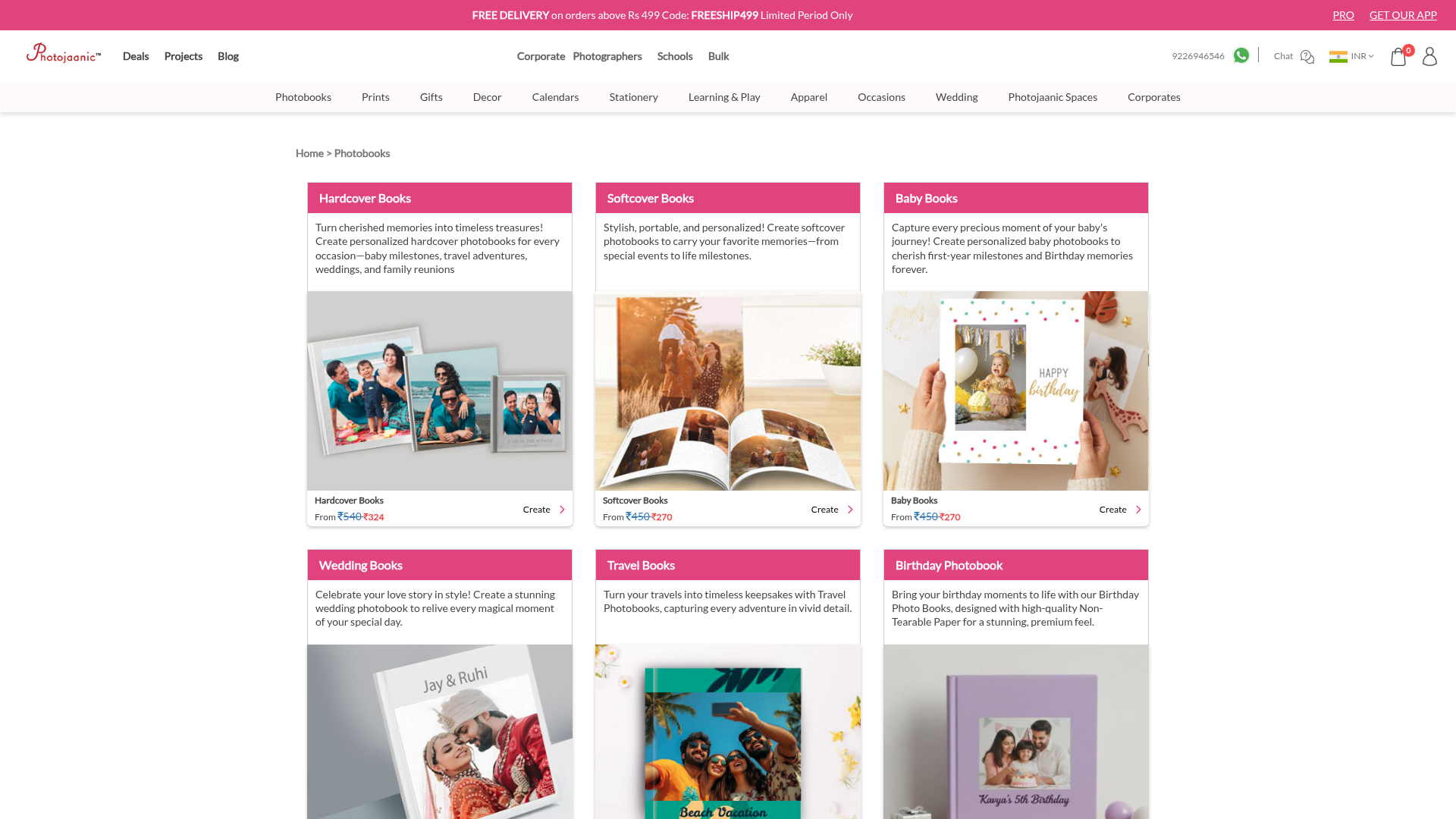
Photojaanic is a leading online platform dedicated to transforming digital memories into tangible, personalized photo products. It serves as a comprehensive solution for individuals, families, and organizations to create custom photobooks, prints, decor, gifts, and stationery, preserving cherished moments for a lifetime. The platform caters to a wide audience, from individuals celebrating personal milestones like weddings and birthdays to corporates and schools seeking branded merchandise and yearbooks. Key Features Extensive product catalog including photobooks (hardcover, softcover, layflat), photo prints, wall decor, personalized gifts, calendars, and stationery. User-friendly online design tools with a variety of templates, layouts, fonts, and stickers for easy customization. High-quality printing and binding options, including premium lay-flat binding and durable, non-tearable paper. Exclusive products and offers available through their dedicated mobile application. Specialized services for bulk orders, corporate gifting, school yearbooks, and merchandise stores. Nationwide delivery across India, ensuring accessibility for all customers. Use Cases Photojaanic is ideal for commemorating life's significant events. Users can effortlessly design stunning wedding photobooks to relive their special day, create adorable baby photobooks to capture every first, or compile travel photobooks to immortalize their adventures. Beyond personal keepsakes, the platform empowers users to craft unique personalized gifts such as custom mugs, keychains, and magnets, perfect for any occasion. For businesses and educational institutions, Photojaanic offers tailored solutions for corporate branding, employee swag, school yearbooks, and university merchandise. It simplifies the process of turning digital assets into professional, high-quality physical products, fostering community and brand identity. Pricing Information Photojaanic operates on a product-based pricing model, where users pay for the specific items they create and order. Product prices vary depending on the type and customization, with options like Hardcover Books starting from Rs 540 and Softcover Books from Rs 450. The platform frequently offers promotions, such as "FREE DELIVERY on orders above Rs 499" using specific codes like FREESHIP499, providing value to customers. User Experience and Support The platform boasts a user-friendly interface and an intuitive online photo album maker, making the design process straightforward even for beginners. Photojaanic provides robust customer support through multiple channels, including a live chat feature, direct phone support (9226946546 available Mon - Sat 9:00 am – 5:30 pm), and email assistance (customercare@photojaanic.com), ensuring users receive timely help and guidance. Technical Details While specific programming languages or frameworks are not explicitly mentioned, Photojaanic operates as a robust web-based platform, complemented by a dedicated mobile application for enhanced accessibility and exclusive features. This dual-platform approach ensures a seamless user experience across various devices. Pros and Cons Pros: Wide array of customizable photo products; intuitive online design tools; high-quality printing and binding; mobile app with exclusive content; excellent customer support; caters to both individual and bulk/corporate needs. Cons: Primarily a paid service for products with no free creation tier; specific technical stack details are not publicly disclosed; extensive customization might require a slight learning curve for new users. Conclusion Photojaanic stands out as a versatile and reliable SaaS solution for anyone looking to transform their digital photographs into beautiful, lasting physical products. Its commitment to quality, user-friendliness, and diverse product offerings makes it an excellent choice for preserving memories and creating personalized gifts. Explore Photojaanic today to bring your happiest moments to life!

Hairstyle AI is an innovative SaaS platform that leverages artificial intelligence to allow users to virtually try on various hairstyles, hair colors, and beard styles. Its primary purpose is to remove the guesswork from hair transformations, helping individuals visualize new looks before committing to a cut or color. This AI-powered tool is ideal for anyone considering a style change, from personal users to professional barbers and stylists.Key Features:Virtual Try-On: Instantly preview 30+ hairstyles, 20+ hair colors, and various beard styles on your own photo.AI-Powered Editing: Describe desired changes using natural language (e.g., "layered bob with soft waves," "warm copper highlights").Realistic Previews: Compare highly realistic results to make informed decisions before a salon appointment.Extensive Style Library: Access a wide range of classic cuts, modern trends, natural shades, and vivid tones.Beard & Facial Hair Options: Experiment with different beard densities, outlines, and shapes.Age Preview: Visualize how a chosen style might appear across different age groups (Baby, Child, Teen, Young, Mature, Old).Use Cases:Hairstyle AI is invaluable for personal style exploration, allowing users to experiment with countless looks from the comfort of their home. This eliminates the anxiety of an unknown outcome, especially for those considering drastic changes like a pixie cut, a bold color, or a new beard style. Users can confidently narrow down their options and save their favorite looks.For professional barbers and stylists, the platform serves as an excellent client consultation tool. They can use Hairstyle AI to show clients realistic previews of potential cuts, colors, and beard trims, ensuring clear communication and client satisfaction. This helps bridge the gap between a client's vision and the stylist's execution, leading to better outcomes.Ultimately, Hairstyle AI empowers users to make informed decisions about their appearance. By providing a visual representation of potential changes, it significantly reduces the risk of dissatisfaction after a salon visit, fostering confidence in choosing a new look by allowing side-by-side comparison of multiple options.Pricing Information:Hairstyle AI is free to download on both the App Store and Google Play, offering a freemium model for users to explore its core features.User Experience and Support:The platform boasts a highly intuitive user interface, emphasizing ease of use with a simple 'Upload -> Choose -> Result' workflow. Users can upload a clear selfie and test new looks in seconds. While specific support documentation isn't detailed, the app's availability on major app stores suggests a streamlined and user-friendly mobile experience.Technical Details:Hairstyle AI is built on advanced artificial intelligence technology, enabling its realistic virtual try-on and natural language processing capabilities for style descriptions. The core functionality relies on sophisticated AI algorithms to generate accurate and personalized visual previews.Pros and Cons:Pros: Highly realistic AI-generated previews; Extensive library of hairstyles, colors, and beard options; Intuitive text-based editing for precise customization; Reduces guesswork and potential dissatisfaction from style changes; Accessible on popular mobile platforms (iOS, Android).Cons: No explicit mention of advanced customization beyond text prompts; Quality of results may depend on the clarity of the uploaded selfie; Specific technical support channels are not detailed in the provided content.Conclusion:Hairstyle AI offers a powerful and convenient way to explore personal style transformations with confidence, leveraging cutting-edge AI. Its AI-driven virtual try-on capabilities make it an indispensable tool for anyone considering a new hair or beard look, ensuring satisfaction before commitment. Explore Hairstyle AI today to find your perfect style.

Resize Image for Instagram is a free, browser-based online tool designed to quickly and accurately resize images for various social media platforms, including Instagram, TikTok, Facebook, LinkedIn, and YouTube. It targets marketers, content creators, and anyone needing to optimize images for social media without quality loss, ensuring visuals are perfectly adapted to each platform's specific requirements.Key FeaturesSupports presets for Instagram, TikTok, Facebook, LinkedIn, and YouTube.100% browser-based processing ensuring images never leave your device.Compatible with JPG, PNG, and WebP image formats.Offers multiple fit modes: Crop (fills canvas), Fit (preserves full image), and Stretch (fills exactly).Completely free to use with no account registration required.Provides specific presets for various post types, such as Instagram square (1080x1080px), portrait (1080x1350px), and Stories/Reels (1080x1920px).Use CasesThis SAAS is invaluable for content creators who need to ensure their visuals are perfectly sized for each social media platform, thereby avoiding unwanted auto-cropping, blurriness due to upscaling, or loss of important details. By pre-resizing images, users maintain full control over their content's appearance.Marketers can significantly streamline their workflow by quickly preparing ad creatives or organic posts for different social media channels. The tool's ability to handle multiple platforms and formats efficiently makes it a time-saving asset for campaign management and consistent brand presentation.Individuals can also easily optimize personal photos for sharing on their preferred platforms. Whether it's a family photo for Facebook or a travel snapshot for Instagram, the tool helps maintain image quality and composition, ensuring photos look their best when shared.Pricing InformationThe Resize Image for Instagram tool is completely free to use. It requires no account registration, making it accessible to everyone without any cost or commitment.User Experience and SupportThe tool boasts a straightforward and intuitive user interface. Users can easily upload photos via drag-and-drop or by clicking the upload zone. Clear instructions are provided on how to select platforms, choose presets, and download the resized images. The FAQ section addresses common queries, enhancing the user experience. Crucially, all image processing occurs locally in the user's browser, ensuring privacy and a seamless experience without server uploads.Technical DetailsAll image processing is performed locally within the user's browser, leveraging the HTML5 Canvas API. This client-side approach means that no files are ever uploaded, stored, or transmitted to any external server, guaranteeing 100% privacy and security for user images.Pros and ConsPros: Free to use, no account required, strong privacy focus (local processing), supports multiple major social media platforms, offers various fit modes, maintains image quality, and is user-friendly.ConclusionResize Image for Instagram offers a secure, efficient, and user-friendly solution for optimizing social media images. Its commitment to local processing and comprehensive presets makes it an invaluable tool for anyone looking to maintain visual quality and control across various digital platforms. Explore this free tool today to perfect your social media visuals.
Seedream 5.0, powered by ByteDance, is a cutting-edge AI image generation platform that redefines creative workflows. It uniquely integrates real-time web search with native 2K/3K output, enabling the AI to understand and execute complex creative contexts with precision. This powerful tool is designed for visionary creators, marketing professionals, filmmakers, e-commerce businesses, and content creators seeking high-fidelity, context-aware visual assets. Key Features Real-Time Knowledge Retrieval: Fetches live contextual information during generation, ensuring visuals are aligned with current trends and facts. Precise Semantic Understanding: Interprets natural language with deep fidelity, accurately translating complex scene descriptions and spatial relationships. Intelligent Spatial & Logical Reasoning: Reasons about object placement, shadows, and multi-step logical prompts for coherent and realistic results. Native 2K & 3K High-Fidelity Output: Generates professional, print-ready assets directly, eliminating the need for external upscaling. Consistency Across Multi-Image Inputs: Maintains identity-locked characters, lighting, and style across multiple outputs for brand continuity. Conversational Magic Editing: Edit images with natural language commands for precise adjustments without complex tools. Use Cases Seedream 5.0 revolutionizes various professional fields. For Marketing & Advertising, it enables rapid generation of high-impact social media ads and promotional clips, allowing easy background swaps or style adjustments for seasonal campaigns. In Film & Pre-visualization, it empowers teams to build entire worlds and generate high-fidelity animatics, visualizing lighting, pacing, and composition before production even begins. E-Commerce & Product Demos benefit from transforming static product photos into immersive lifestyle videos, showcasing products in action across diverse environments with a single click. Content Creators can elevate their YouTube or TikTok channels with cinematic B-roll and high-end visual effects previously exclusive to large studios, democratizing professional-grade visuals. Pricing Information Seedream 5.0 operates on a flexible credit pack model, offering Basic, Standard, and Premium options with one-time payments. All credits never expire and include 2K & 3K high-resolution output, text-to-image generation, image-to-image editing, no watermarks, and full commercial usage rights. A 7-day refund policy ensures customer satisfaction. User Experience and Support The platform is engineered for impact, focusing on an intuitive user experience where creators can "direct a model, not just prompt it." Its natural language interface simplifies complex tasks like scene descriptions and precise editing. Direct support is available for users, ensuring a smooth creative workflow. Technical Details Underpinned by a "Neural Reasoning Architecture," Seedream 5.0 leverages advanced AI for context-aware reasoning and real-time semantic retrieval. This sophisticated engine processes prompts to deliver visually accurate, semantically aligned, and contextually grounded results, pushing the boundaries of AI image generation. Pros and Cons Pros: Real-time knowledge integration, exceptional semantic and logical reasoning, native high-resolution output (2K/3K), strong consistency across generations, natural language editing capabilities, commercial usage rights included, one-time credit purchases. Cons: No explicit free trial mentioned, advanced features might require a learning curve to master precise control, no mention of API for external integrations. Conclusion Seedream 5.0 stands as a pivotal advancement in AI image generation, offering unparalleled intelligence, precision, and professional-grade output. It empowers creators and businesses to transform their ideas into stunning, contextually relevant visuals with remarkable speed and accuracy. Explore Seedream 5.0 today to unlock the next generation of AI-powered creativity.