AI Invitation Maker by Greetings Island Review - Create Stunning Event Invites in Seconds
Planning a celebration used to mean either hiring a designer or spending hours wrestling with layout software. Greetings Island flips that script with an AI-driven invitation builder that anyone can use.
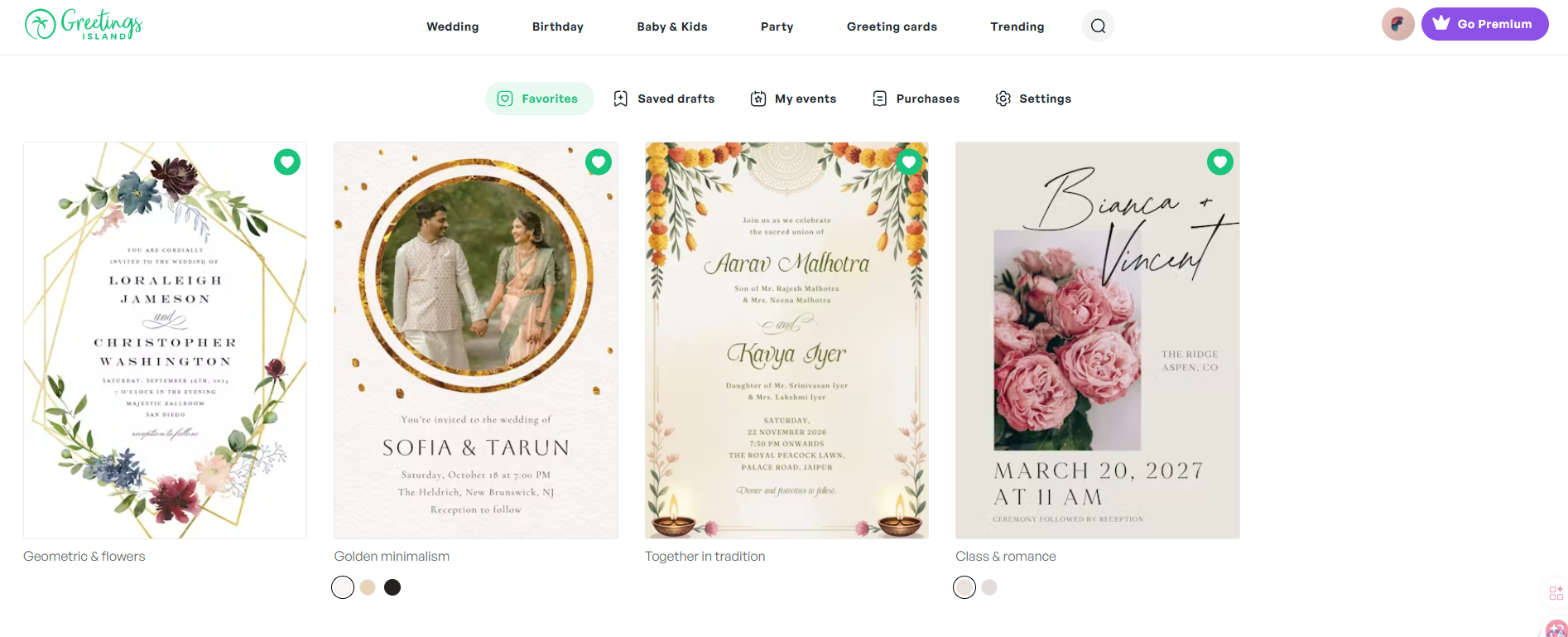
Whether you're organizing a wedding, a child's birthday, a baby shower, or a casual get-together, the invitation sets the tone for everything that follows. The catch? Beautiful invitations have historically demanded real design skill, or a real budget. Greetings Island removes both barriers. Its AI invitation generator turns a plain sentence like "elegant gold wedding invite for Sarah and Michael, June 20th" into an invitation design within seconds.
How Greetings Island describes itself: the service provides web and mobile tools for invitations and cards that can be downloaded, printed, or sent online. Invitations can include RSVP and event-management features.
What makes this tool stand out isn't just the speed. Most AI generators hand you a flat image you can't touch. Greetings Island gives you an editable layout: change the words, move supported elements, swap fonts, drop in stickers, add your own photos. Then manage RSVPs, download for printing, share a link, or send it digitally, all from one place.
This review walks through how the platform helps hosts create polished invitations for any occasion, no design background required. Product capabilities, plan contents and prices change over time, so confirm the details on Greetings Island's own pages before you rely on them.
Why Traditional Invitation Design Falls Short
Most approaches to invitations come with friction:
- Hours of creative work — building something from a blank canvas takes time most hosts don't have
- Samey templates — rigid designs that rarely match your personal style
- Hard to edit — changing a font or color often means starting over
- Separate RSVP tools — designing is one app, tracking replies is another
- Locked-in images — some generators produce files you can't tweak after the fact
- Cost — professional designers are out of reach for budget-conscious planners
Greetings Island answers each of these with AI generation plus end-to-end event tooling, so the result looks custom without the custom price tag.
What You Get With Greetings Island
- ✨ Describe-and-generate AI — type your event in everyday language and watch a design appear
- 🎨 Drag-and-drop editing — adjust text, fonts, colors, stickers, and photos (which elements can be edited depends on the template)
- 📅 Built-in RSVP — add response links, gift registries, and maps with a single click
- 🎉 Any occasion — weddings, birthdays, baby showers, parties, holidays, business events
- 🆓 Free and paid options — some invitation creation is available at no cost, with paid plans that add more; check the official pricing page for what is currently included
- 📱 Mobile app — free on the App Store and Google Play to edit and share anywhere
- 🔗 Flexible delivery — print, share online, or send digitally
- 🖼️ Your photos become the design — upload your own images and event details so the invitation is built around them
- 🌐 Huge template catalog — thousands of professionally designed layouts
- 💾 Save & reuse — keep drafts and favorites for future events
- 🌈 Style range — elegant, rustic, floral, modern, simple, vintage, beach, and more
Inside the Features
A Library for Every Occasion
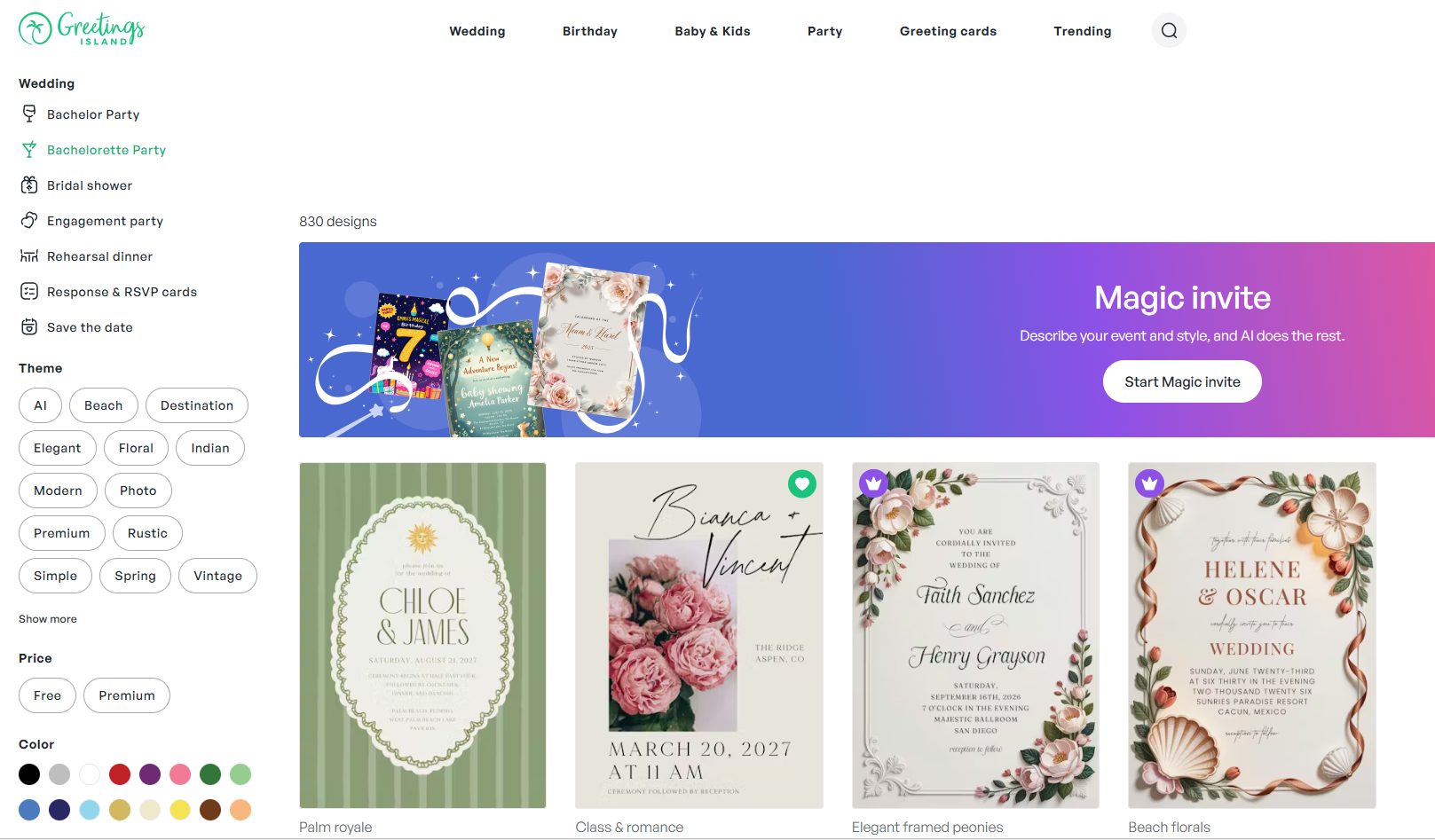
Greetings Island organizes its catalog by event type so you're never starting from nothing.
Weddings: AI-generated, elegant, rustic, floral & botanical, modern, simple, Indian, vintage, beach, photo, destination, and premium styles. Stationery covers save-the-dates, RSVP cards, bridesmaid cards, and engagement or wedding announcements, plus pre-wedding parties (engagement, bridal shower, bachelor/bachelorette, rehearsal dinner) and wedding greetings.
Birthdays: invitations for kids, women, men, babies, teens, and milestone ages including 1st, 2nd, 10th, 13th, sweet 16, quinceañera, bar & bat mitzvah, and adult milestones from 18th through 90th. Themes span princess, animal, unicorn, butterfly, dinosaur, rainbow, mermaid, gaming, and more.
Baby & kids: baby shower, gender reveal, baby sprinkle, sip & see, plus baby shower themes (floral, woodland, safari, princess, rustic, elephant, rainbow, dinosaur, fiesta) and announcements. Religious events include baptism & christening and bar & bat mitzvah.
Parties: graduations, anniversaries, retirements, engagement parties, memorials, and gatherings like housewarmings, dinner parties, BBQs, picnics, and holiday events (Ramadan, Easter, Halloween, Diwali, and more). Business events cover galas, grand openings, and open houses.
Greeting cards: birthday, thank-you, and "thoughts & feelings" categories for every relationship and moment.
No matter the event, you'll find a starting point that fits.
The Editor That Makes It Yours
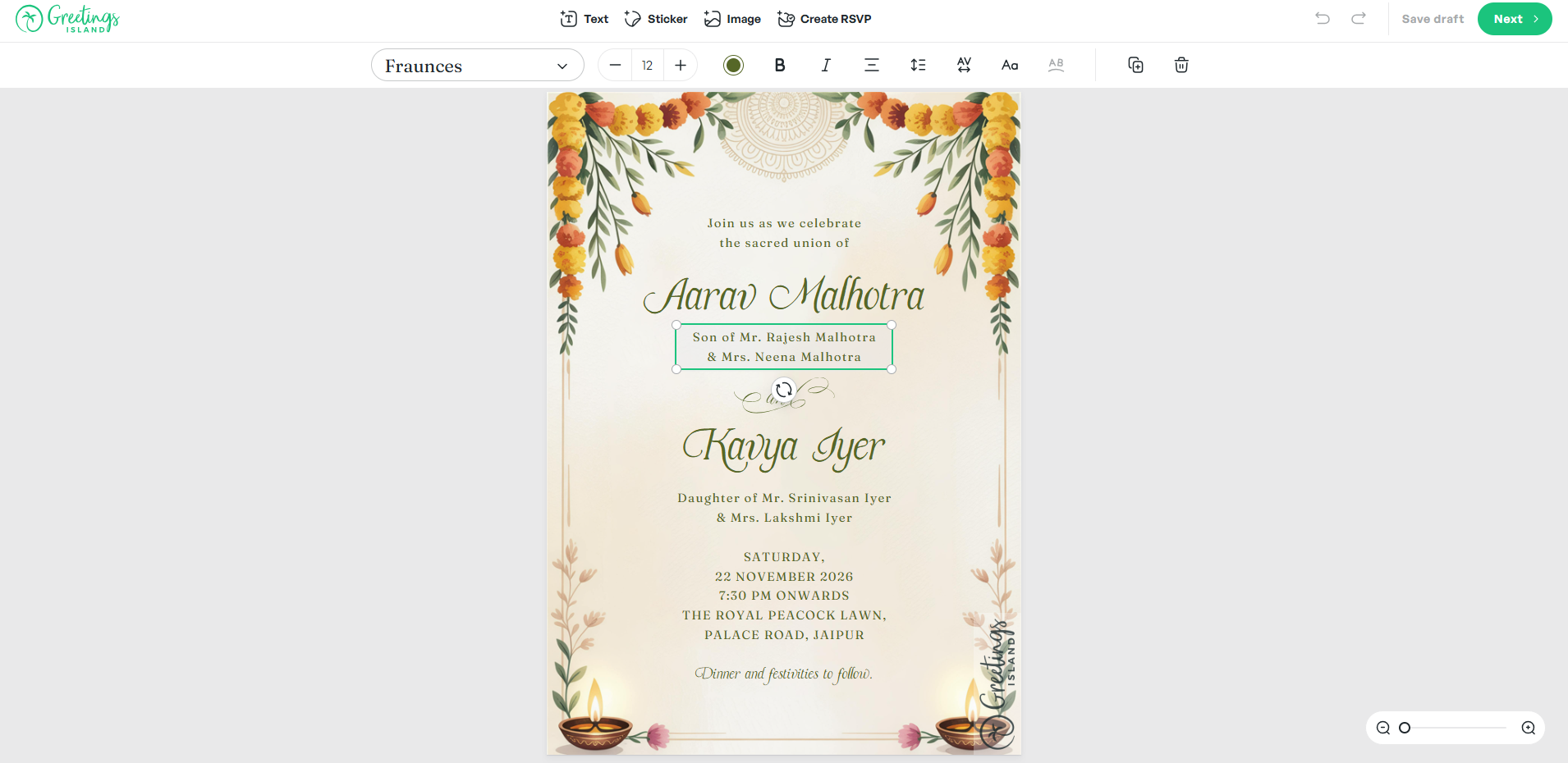
Where Greetings Island pulls ahead of other AI generators is the editor. AI gives you a first draft; the editor lets you make it unmistakably yours.
- Text: adjust fonts, sizes, colors, and placement
- Elements: move, resize, and rearrange supported components (which layers you can move depends on the template and on how the design was generated, so some parts of a design are fixed)
- Fonts: a range of options to choose from
- Colors: retune the palette to match your theme
- Stickers: decorative touches and embellishments
- Photos: upload and position your own images
- Layout adjustment: change composition and spacing within the limits of each template
Editable templates mean you can personalize names and dates, fix typos without restarting, match your decor, make last-minute venue changes, and turn a generic template into something personal.
Magic Photo: Your Pictures, Reimagined
Turn a meaningful photo into a finished invitation in five steps:
- Pick a Magic Photo design from the AI photo template collection
- Upload your image — a wedding portrait, baby photo, or birthday moment
- AI blends it in with professional design elements
- Customize text, embellishments, and details
- Finish by downloading, printing, sharing, or tracking RSVPs
Magic Photo shines for wedding announcements, birthday highlights, baby showers, anniversaries, graduations, and family reunions—adding the emotional pull of a real photo.
AI Magic Invite: From Sentence to Send-Ready
The Magic Invite is the core experience. It works in four moves:
- Describe the event — what, when, where, and the vibe you want
- AI builds it — a ready-to-edit design appears in seconds
- Refine your design — fonts, colors and layout, adjustable in the editor where the template allows it
- Deliver — download for print, share online, send digitally, manage RSVP
The AI understands plain language. Tell it "a floral baby shower invitation with pastel colors for March 15th at 2pm" and it produces a solid starting point. To get the best result, share the essentials (date, time, location, guest instructions), list what should appear (title, hosts, RSVP info), describe the look (unicorns, balloons, floral frames), and pick a style and palette up front.
This fits busy planners, party organizers, brides-to-be, new parents, and anyone who wants great invitations without the hours.
RSVP and Guest Management
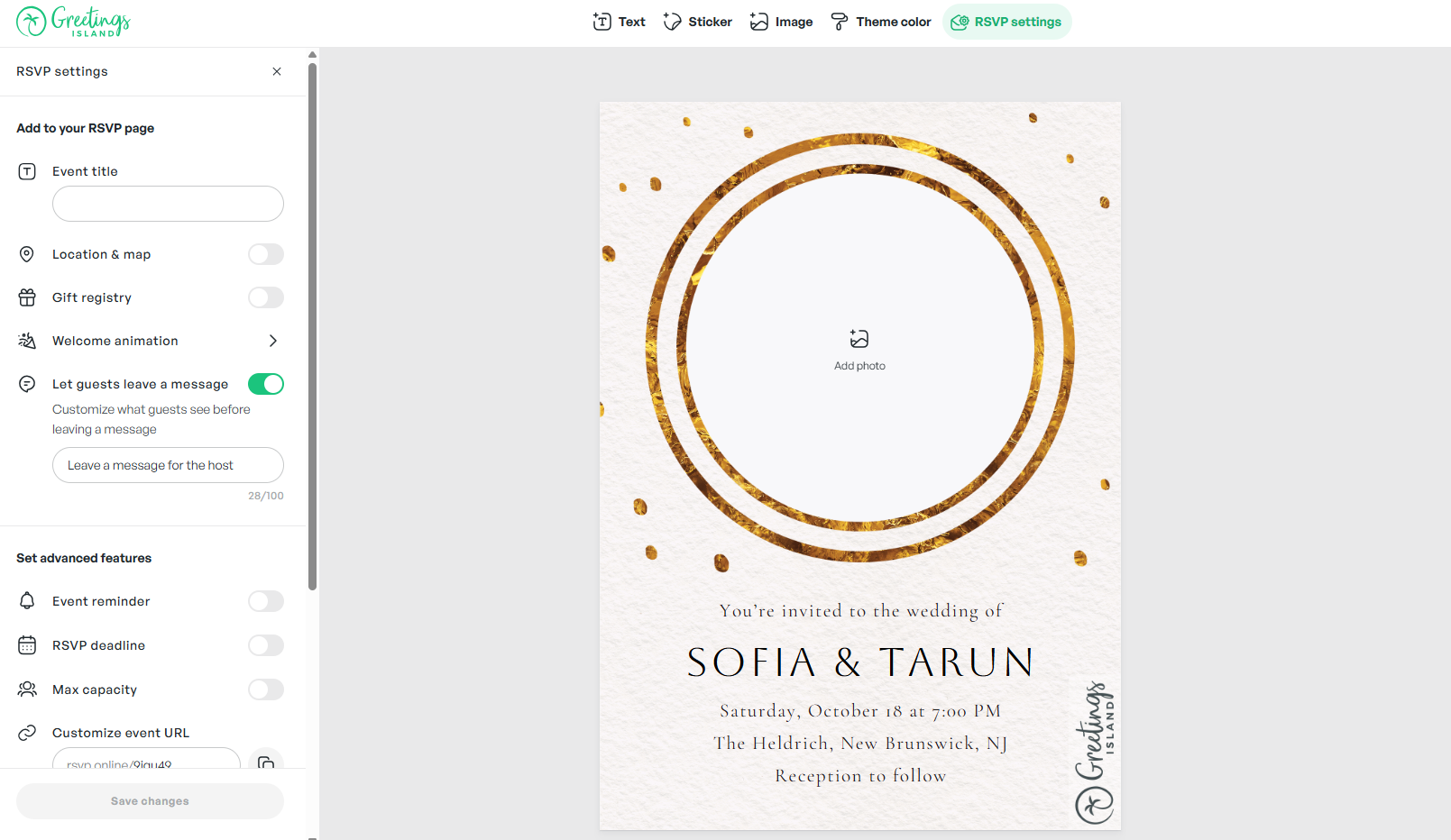
Collecting replies shouldn't need a separate app. With one click you can add:
- Online RSVP links for digital responses
- Gift registry links for weddings and baby showers
- Map links with directions
- Extra info like parking, dress code, or notes
The payoff: centralized tracking, fewer phone calls, accurate headcounts for catering and seating, guest convenience, and a workflow that works for modern hosts.
Pricing: Plans and Availability
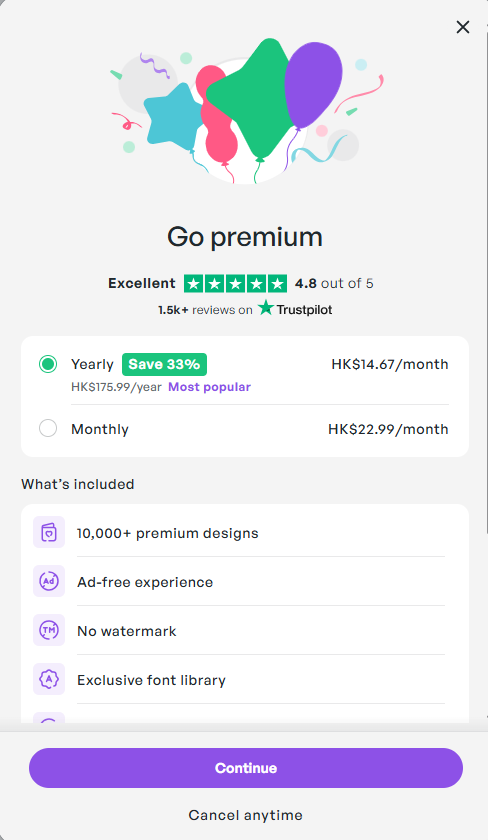
Greetings Island offers a mix of free and paid options, and the lineup has changed more than once.
- Free and paid options — some invitation creation is available at no cost, alongside paid memberships that add more
- Details change over time — which features sit on which plan, how many credits a plan includes, and the current prices are set by Greetings Island and can change at any time
- Check the official page — for the current breakdown, read the plan details on Greetings Island before committing
Because plan contents, credit limits and prices move around, we deliberately do not publish a feature-by-feature tier comparison here. What the service supports right now is described on its own pricing pages, and invitations can include RSVP and event-management features.
Where the value comes from, rather than a specific feature list: time saved on design, a consistent look across matching stationery, guest handling next to the design, and a choice of download, print or online delivery.
Getting Started and Compatibility
Greetings Island is web-based and built for accessibility:
- Account — create an account to save your designs; see the official site for what each plan currently includes
- Internet — needed for AI generation and cloud editing
- Browser — any modern one, on desktop, tablet, or phone
- Mobile app — free on the App Store and Google Play for editing on the go
- No install — everything runs in the browser or app
- Web and mobile access — create and manage invitations on the website or in the free mobile app
To create an invitation: visit the AI Invitation Generator, describe your event, choose a style and colors, generate, customize, add RSVP details, then share by print, link, or digital send. The AI reads natural language, so just describe what you want.
How It Compares
| Feature | Greetings Island AI | Canva | ChatGPT/Gemini |
|---|---|---|---|
| AI-Powered Design | ✅ Yes | ✅ Limited | ✅ Yes |
| Editable Designs | ✅ Yes (varies by template) | ✅ Yes | ❌ No (Static) |
| Natural Language Input | ✅ Yes | ❌ No | ✅ Yes |
| RSVP Management | ✅ Built-in | ❌ Separate | ❌ No |
| Photo Integration | ✅ Yes | ✅ Yes | ⚠️ Limited |
| Print Downloads | ✅ Yes | ✅ Yes | ❌ No |
| Template Library | ✅ Thousands | ✅ Millions | ❌ No |
| Free Option | ✅ Yes | ✅ Limited Credits | ⚠️ Depends |
| Mobile Friendly | ✅ Yes | ✅ Yes | ✅ Yes |
| Event-Specific Categories | ✅ Extensive | ✅ General | ❌ No |
This table is an orientation aid, not a specification. Plan contents, credit limits and feature availability change, so confirm current details on Greetings Island's own pricing pages.
What sets Greetings Island apart is the blend of AI generation with genuine customization, plus event-specific templates and built-in RSVP—a one-stop shop for hosts rather than a generic design tool.
Who Benefits Most
👰♀️ Brides-to-be coordinate save-the-dates, showers, and rehearsal dinners in matching styles.
👶 New and expecting moms announce showers, gender reveals, and births with personal photos.
🎂 Busy moms whip up kids' party invites—from princess to superhero—in minutes.
🎓 Young women create on-trend invites for graduations, sweet 16s, and social events, including on the free option.
👨👩👧👦 Multi-generational families plan reunions and holidays using photos and custom messages.
🎉 Social hostesses set the tone for dinners, brunches, and get-togethers without the design grind.
Final Verdict
After working through Greetings Island's AI invitation maker, the standout is how it pairs AI speed with real creative control. The Magic Invite drafts in seconds; the editor makes sure the final piece matches your vision. The free option removes any reason not to try it, and paid plans scale up when you need them; what each plan currently includes is listed on Greetings Island's pricing pages. Visit Greetings Island to give the AI invitation generator a spin.
It's especially valuable for anyone planning weddings, milestone birthdays, baby showers, or any event where a personalized invite sets the mood.
Review Summary
- Ease of Use: ⭐⭐⭐⭐⭐ (5/5)
- Design Quality: ⭐⭐⭐⭐⭐ (5/5)
- Customization Options: ⭐⭐⭐⭐⭐ (5/5)
- Template Variety: ⭐⭐⭐⭐⭐ (5/5)
- AI Generation Speed: ⭐⭐⭐⭐⭐ (5/5)
- RSVP Integration: ⭐⭐⭐⭐⭐ (5/5)
- Value for Money: ⭐⭐⭐⭐⭐ (5/5)
- Overall Review Score: ⭐⭐⭐⭐⭐ (5/5)
Ready to make invitations in seconds? 👉 Try AI invitation maker by Greetings Island today. Turn event planning into something fast, fun, and beautifully personal with AI-powered design.
Tags
# Review# AI invitation maker# invitation# design# rsvp# AI invitation generator# event invitations# wedding invitations# birthday invitations# party invitations# baby shower invitations# invitation templates# generative AI# custom invitations# digital invitations# invitation design# event planning# invitation maker# AI-powered design# RSVP management# print invitations# online invitations# femaleFocus Apps
Editorial team at Focus Apps
AIChatOne Analysis - The Unified AI Platform That Transforms Browser Workflow
About Us
Follow for new blogs
Subscribe to our blog
Subscribe to Newsletter
Subscribe to our newsletter to get the best products weekly.