Jam SQL Studio Review - AI-Native Cross-Platform SQL IDE for Mac, Windows, and Linux
The SQL Client Built for the AI Era
Welcome to our Jam SQL Studio review. With Microsoft retiring Azure Data Studio on February 28, 2026, Mac and Linux users lose a familiar cross-platform tool. Jam SQL Studio arrives as an AI-native, cross-platform SQL IDE built for modern workflows.
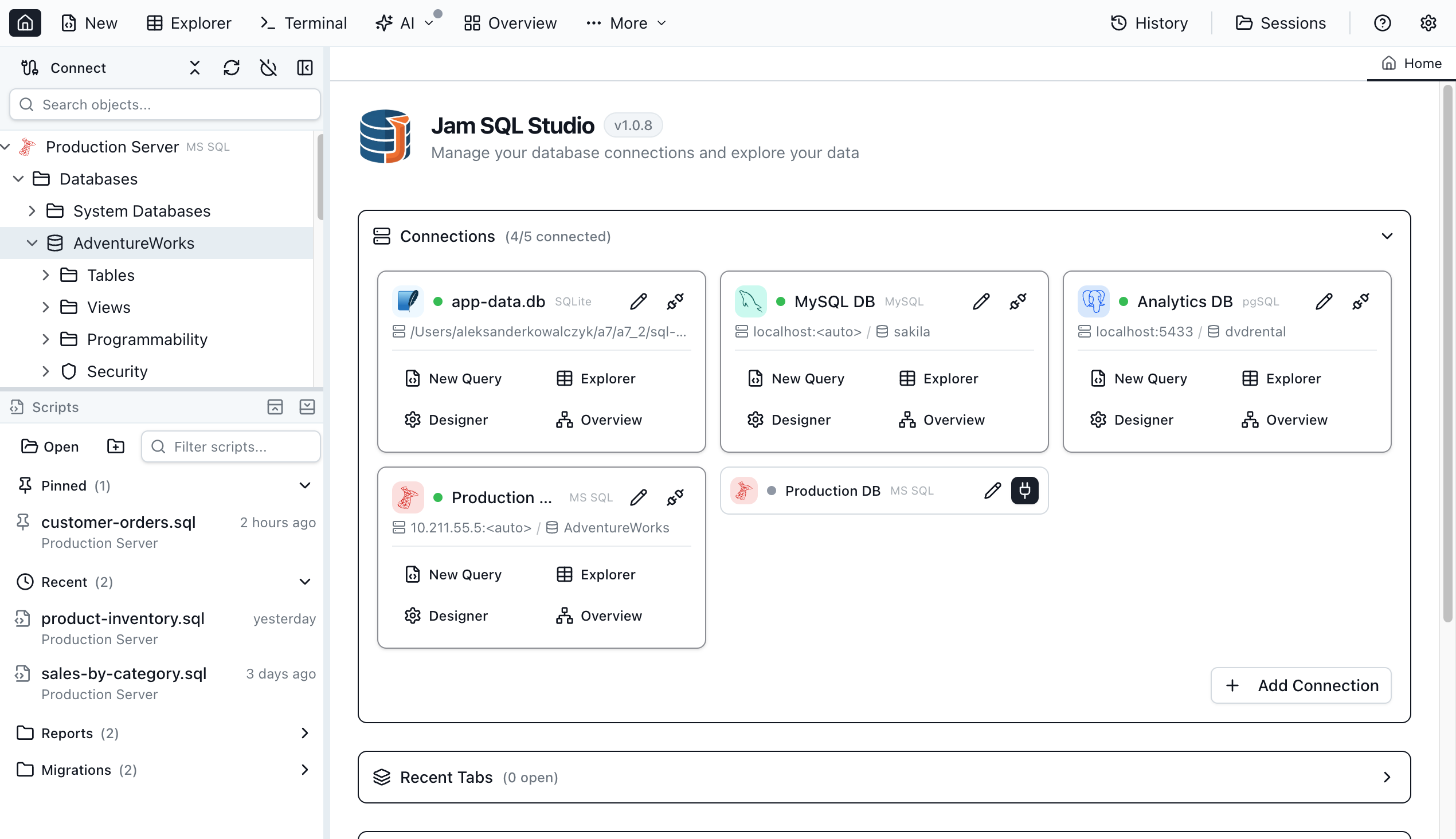
Unlike dated clients, it ships a built-in MCP server, pro features like schema compare and execution plans, and first-class macOS, Windows, and Linux support.
The outcome? A professional SQL client that doesn't trade cross-platform support for enterprise power.
The Gap It Fills
- Azure Data Studio retirement on Feb 28, 2026
- Mac/Linux limits — SSMS is Windows-only
- Outdated experiences — no AI autocomplete, notebooks, or assistant integration
- Costly enterprise features — schema/data compare locked behind big subscriptions
- AI integration gaps — few clients offer secure MCP access
- Performance overhead — slow cross-platform clients
Why Choose It
- ✨ AI-native — MCP server (13 tools, 9 resources) for Claude, Copilot, and more
- 🗣️ Natural language to SQL
- 🎨 Built-in charting — bar, line, pie, area, scatter
- 📓 SQL notebooks — Jupyter-compatible .ipynb
- ⚡ Smart IntelliSense with real-time error checking
- 📊 Execution plan visualization
- ⚖️ Schema & data compare
- 🗺️ Visual schema overview
- 🤖 AI workspace sync to .sql with context files
- 🔗 Cross-platform desktop apps
- 🗄️ Multi-database — SQL Server, PostgreSQL, MySQL, MariaDB, SQLite, Azure SQL
- 🆓 Free personal tier — unlimited SQL Server/PostgreSQL/MySQL
- 💰 Transparent — $9.99/mo or $99/yr, 14-day trial, no card
- 💻 jam-sql CLI
- 🔄 Session persistence
Core Features
AI-Native Tooling: MCP & Workspace
The desktop app runs a local MCP server for safe AI access:
- 13 MCP tools, 9 MCP resources
- Secure by default — binds 127.0.0.1, bearer token, read-only by default
- Policy controls — block/confirm/allow with audit logging
- No password exposure — agents see connection names only
AI assistants (Claude Desktop, Claude Code, Copilot, custom agents) can list connections, open tabs, write SQL, and run policy-controlled queries.
AI Workspace auto-generates context files:
- Bidirectional .sql sync
- Auto-generated
CLAUDE.mdandAGENTS.md - Schema export to
.schema/ - Results history in
.history/ - Knowledge pack in
.knowledge/
Claude Code CLI runs in-app using your local subscription—no extra keys, privacy-first, opt-in.
The generated CLAUDE.md looks like:
# Jam SQL Studio - AI Context

## Active Connection

- Name: Production DB
- Engine: PostgreSQL 15.2
- Database: ecommerce_prod

## Database Schema

Tables: 24 | Views: 8 | Functions: 12

users (id, email, name, created_at, subscription_tier)
orders (id, user_id → users.id, total, status, created_at)
products (id, name, price, category_id → categories.id)
order_items (order_id → orders.id, product_id → products.id, qty)

## MCP Tools Available

✓ query_execute - Run read-only SQL (SELECT, EXPLAIN)
✓ connections_list - List saved connections
✓ ui_open_tab - Open query/table tabs
✓ ui_set_editor_text - Write SQL to editor
Ideal for: AI-assisted dev teams, Claude users, and orgs building custom agents.
SQL Notebooks
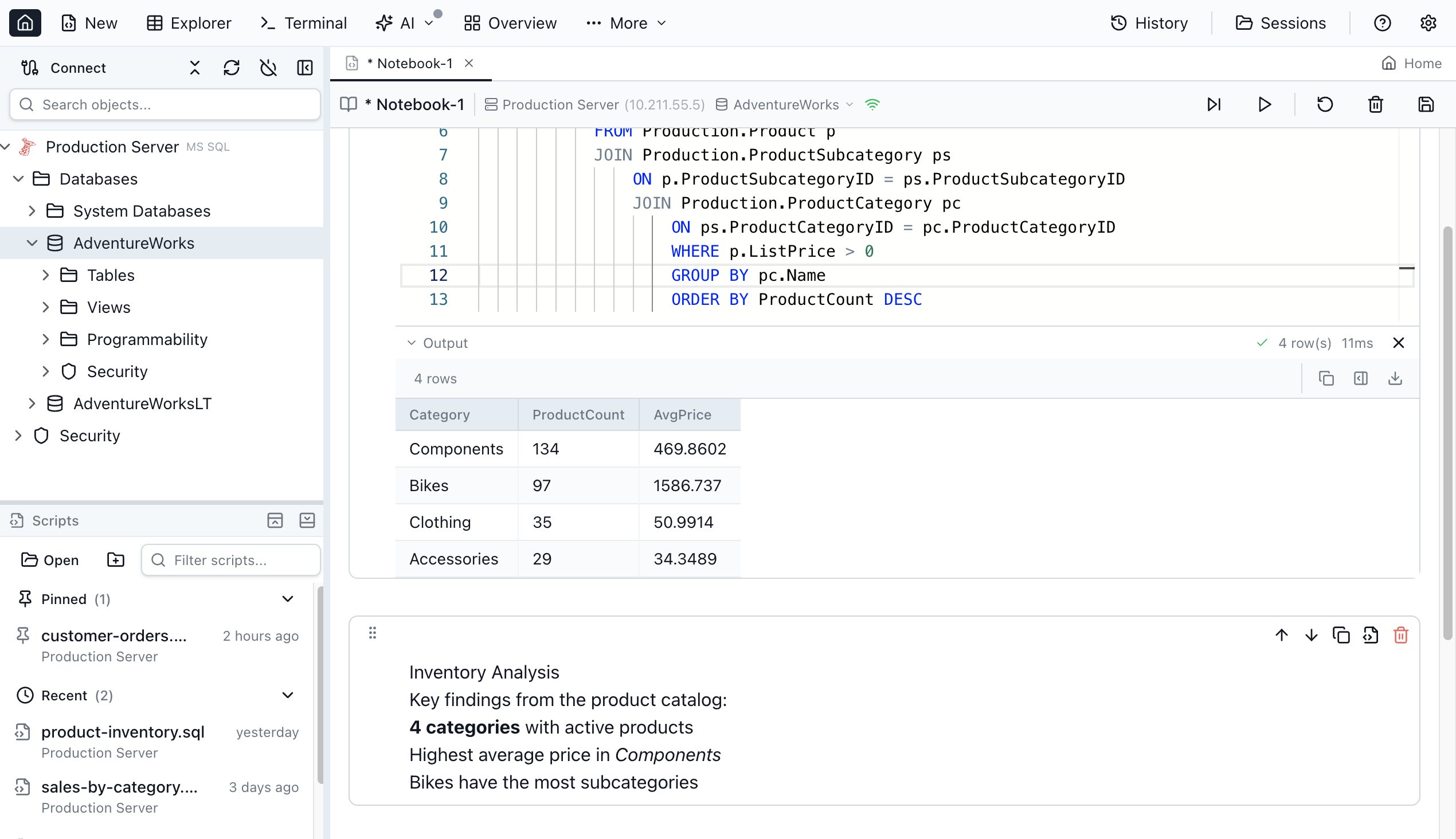
- SQL + JavaScript cells, Markdown docs, inline results
- Shared sessions, Run All, export .ipynb
- Use cases: analysis reports, runbooks, onboarding, perf investigations, ETL
Smart IntelliSense & Editor
- Context-aware autocomplete for tables, columns, functions, keywords
- Real-time error checking, query history, tab management
- Transaction modes, SQL snippets, script management
- Natural language to SQL and integrated terminal
Execution Plans
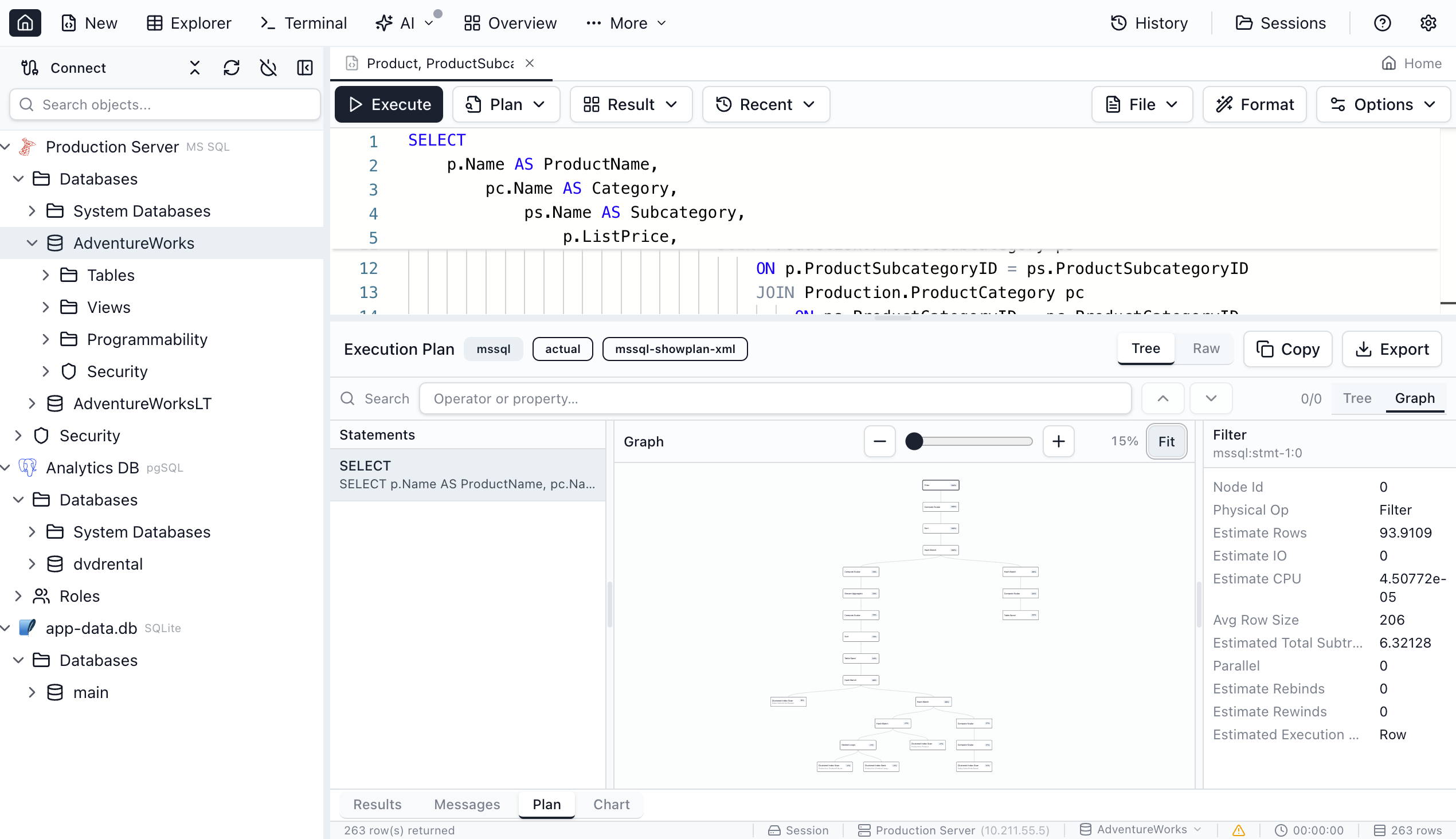
Tree/graph views, cost breakdown, side-by-side comparison, import/export, expensive-op highlights—available on Mac, Windows, and Linux.
Schema & Data Compare
- Schema compare: side-by-side DDL diffs, sync script generation, dev/staging/prod comparison
- Data compare: row-level, color-coded, INSERT/UPDATE/DELETE scripts
In the Pro tier at a fraction of enterprise cost.
Charting & Visualization
Bar, line, pie, area, scatter—generate from results, export SVG/PNG.
Visual Schema & Dependency Viewer
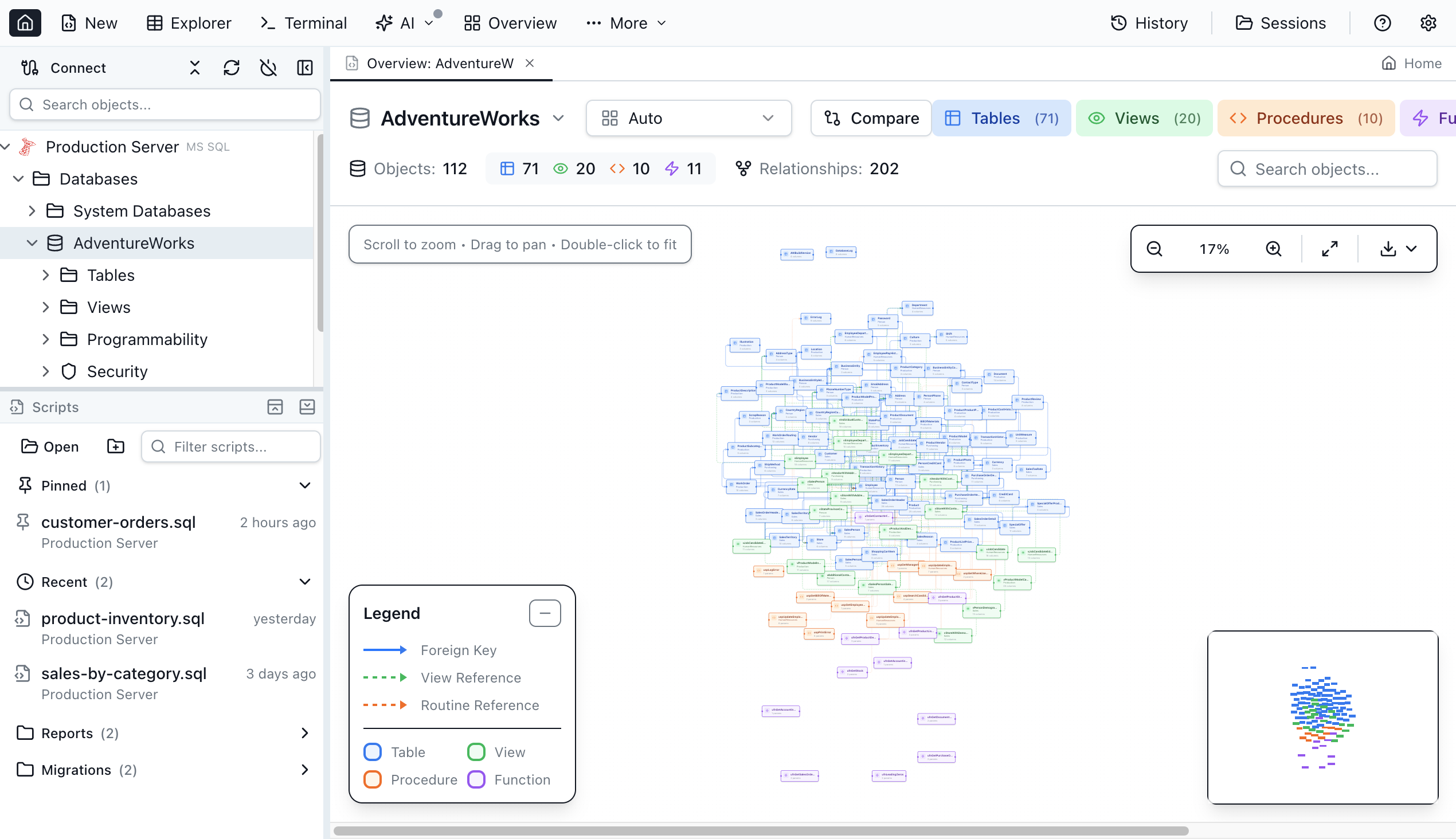
Interactive graph of tables/views/procedures with FK arrows; dependency viewer for impact analysis.
Table Explorer
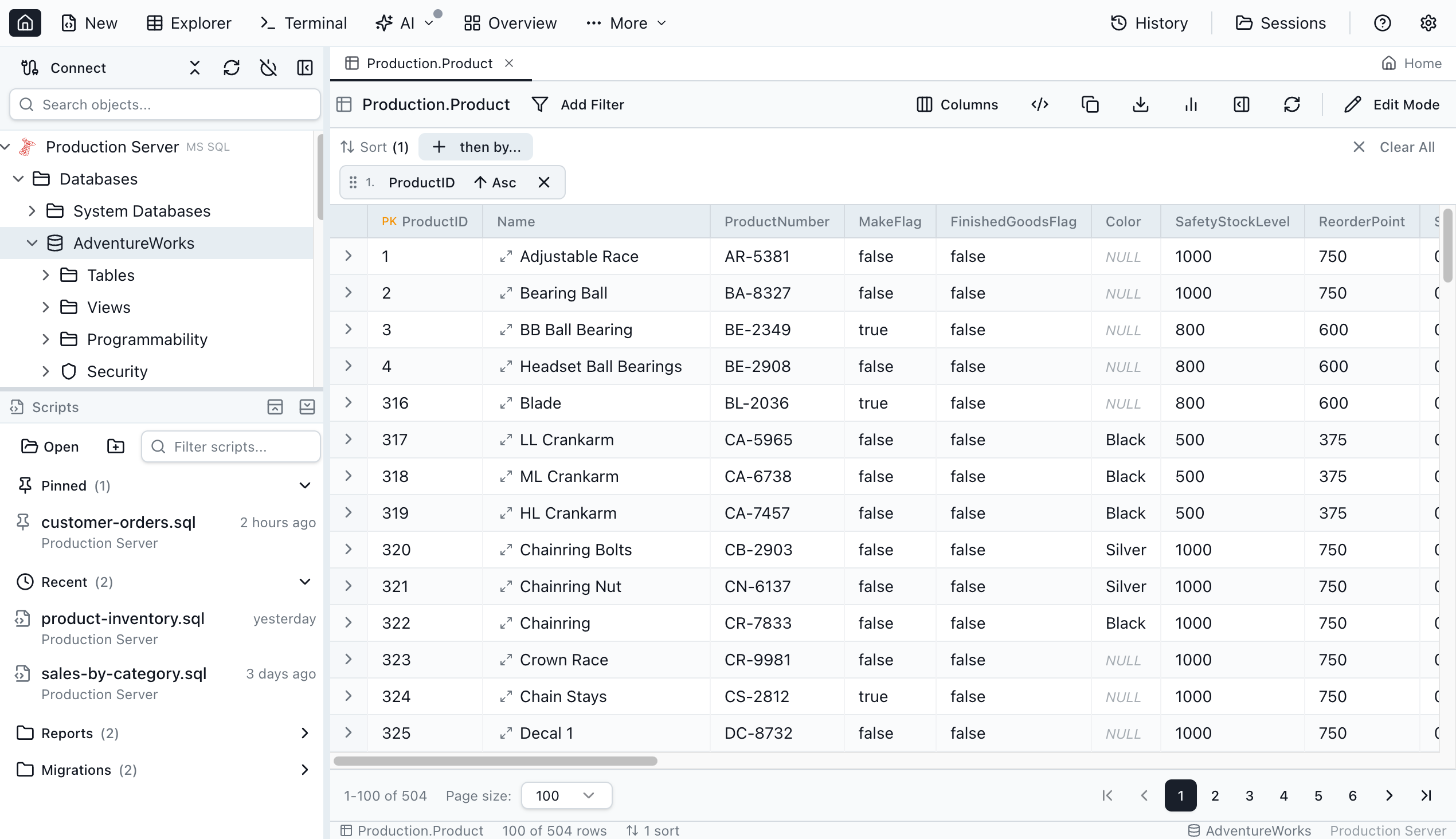
Spreadsheet-like browsing, inline editing, FK navigation, export CSV/JSON/XLSX, backup/restore, clone.
Session Persistence & CLI
Auto-saved workspace; jam-sql doctor, connections, query, tools/resources. Use cases: CI scripts, quick checks, remote ops.
PostGIS (Coming Soon)
Geometry visualization, spatial types, map rendering, spatial query IntelliSense.
Database & Platform Support
- Engines: SQL Server (incl. Azure), PostgreSQL, MySQL (5.7+/8.x), MariaDB, SQLite
- Platforms: native macOS, Windows, Linux apps
- Auth: SQL, Windows, Microsoft Entra ID
Who Should Use It
Backend developers, DBAs (especially on Mac/Linux), AI-first teams, Azure Data Studio migrants, performance-conscious devs avoiding DBeaver/DataGrip.
Industries: software, SaaS, fintech, healthcare IT, consulting, e-commerce.
Target: 25–45 pros, intermediate+ SQL, cross-platform, AI-integrated workflows.
Pricing

Personal — Free forever: unlimited SQL Server/PostgreSQL/MySQL, IntelliSense, query execution, table explorer, basic charting, AI workspace sync, execution plans, priority support. No account required.
Pro Monthly — $9.99/mo: advanced charting/export, schema & data compare, priority email, commercial license. 14-day trial, no card.
Pro Yearly — $99/yr: same, ~17% saved.
Enterprise — Custom: volume licensing, priority support, SSO/SAML (soon), dedicated manager.
Migration from Azure Data Studio
With ADS retiring Feb 28, 2026: download, re-create connections, transfer .sql scripts and .ipynb notebooks, explore new features. Familiar SSMS/ADS shortcuts ease the switch.
How It Compares
| Feature | Jam SQL Studio | Azure Data Studio | SSMS | DBeaver | DataGrip |
|---|---|---|---|---|---|
| AI-Native (MCP + Workspace) | ✅ Yes | ❌ No | ❌ No | ❌ No | ⚠️ Limited |
| Claude Code CLI Integrated | ✅ Yes | ❌ No | ❌ No | ❌ No | ❌ No |
| SQL Notebooks (.ipynb) | ✅ Yes | ✅ Yes (Extension) | ❌ No | ❌ No | ❌ No |
| Cross-Platform (Mac/Win/Linux) | ✅ Yes | ✅ Yes | ❌ No | ✅ Yes | ✅ Yes |
| Execution Plan Visualization | ✅ Yes | ✅ Yes | ✅ Yes | ✅ Yes | ✅ Yes |
| Schema Compare | ✅ Yes | ✅ Yes | ❌ No | ✅ Yes | ✅ Yes |
| Data Compare | ✅ Yes | ❌ No | ⚠️ Via Tools | ✅ Yes | ✅ Yes |
| Built-in Charting | ✅ Yes | ✅ Yes | ❌ No | ⚠️ Pro Only | ❌ No |
| Command-Line CLI | ✅ Yes | ❌ No | ⚠️ Limited | ❌ No | ❌ No |
| Natural Language to SQL | ✅ Yes | ❌ No | ❌ No | ❌ No | ⚠️ Limited |
| Free Tier Available | ✅ Yes | ✅ Yes | ✅ Yes | ✅ Yes | ❌ No |
| SQL Server Support | ✅ Yes | ✅ Yes | ✅ Yes | ✅ Yes | ✅ Yes |
| PostgreSQL Support | ✅ Yes | ⚠️ Extension | ❌ No | ✅ Yes | ✅ Yes |
| MySQL / MariaDB Support | ✅ Yes | ❌ No | ❌ No | ✅ Yes | ✅ Yes |
| Modern UI | ✅ Yes | ✅ Yes | ⚠️ Classic | ✅ Yes | ✅ Yes |
Unique: AI-native from the start, cross-platform enterprise features, and a transparent free tier.
Final Verdict
Jam SQL Studio fills a real gap as Azure Data Studio retires in February 2026. Its AI-native architecture—MCP server, AI workspace, context generation—anticipates how developers work in 2026. The free Personal tier is genuinely useful, and Pro at $9.99/mo or $99/yr undercuts enterprise suites. Cross-platform parity is the headline win for Mac and Linux users needing SQL Server access.
Review Summary
- Ease of Use: ⭐⭐⭐⭐⭐ (5/5)
- Feature Completeness: ⭐⭐⭐⭐⭐ (5/5)
- AI Integration: ⭐⭐⭐⭐⭐ (5/5)
- Cross-Platform Support: ⭐⭐⭐⭐⭐ (5/5)
- Performance: ⭐⭐⭐⭐⭐ (5/5)
- Value for Money: ⭐⭐⭐⭐⭐ (5/5)
- Documentation: ⭐⭐⭐⭐⭐ (5/5)
- Overall Review Score: ⭐⭐⭐⭐⭐ (5/5)
Ready to experience the future of SQL development? 👉 Download Jam SQL Studio today. Start your 14-day free trial of Pro features and discover why this AI-native SQL IDE is the perfect Azure Data Studio alternative for Mac, Windows, and Linux.
Tags
# Review# SQL client for Mac# AI SQL editor# Azure Data Studio alternative# SQL Server Management Studio for Mac# SQL notebook Mac# AI-powered SQL client for macOS# best SQL Server client for Mac 2026# SSMS alternative for Mac and Linux# SQL editor with AI autocomplete Mac# SQL IDE# SQL Server# PostgreSQL# MySQL# MCP server# SQL development# database management# schema compare# execution plans# Claude# AI coding assistant# cross-platform SQL toolJust Call AI Review - Hands-Free AI Accessible by Phone
DirEasy Analysis - AI-Powered Directory Boilerplate for Rapid Launch
Follow for new blogs
Subscribe to our blog
Subscribe to Newsletter
Subscribe to our newsletter to get the best products weekly.